Skip to content
Beta readers wanted. The English edition is translated. It will be released once I get feedback from a few beta readers. If you would like to be one of them, tell me: open an issue on GitHub · message me on X.
Cover of Kubernetes 101: near-black blue background, the title in white, the number 101 in Kubernetes blue and the name Javier Vela Aylón at the bottom.

Book · English edition · 2026

Kubernetes 101—the practical guide to understanding Kubernetes from scratch

15 chapters, 5 appendices and a hands-on part with 55 labs on a real cluster, nothing to install. You read the concept and try it right away.

367 pages · 2026 edition · Kubernetes 1.37 · Kindle and paperback

Who it’s for

Who is this book for?

For anyone who wants to really learn Kubernetes, whether or not they come from the IT world. Also—and most of all—for those who already work with the technology every day and never quite understand what’s going on underneath.

It’s the book I wish I had read a few years ago: with diagrams that explain who does what, and a hands-on part where you can break things without fear.

The prologue

Readers

What early readers say

Syllabus

What you’ll learn

Every chapter has its lab, and so does Appendix D. On top of that there’s one block that exists only as a lab: the final challenge.

  • Chapter in the book
  • Hands-on lab
Chapter 01

Introduction to containers and orchestration

Image, container, controller and node, explained before Kubernetes is even named. How the image deployed throughout the book gets built: multistage Dockerfile, distroless base and a process that doesn’t run as root. And the real advantages and disadvantages of containers, plus what gets complicated when you orchestrate them at scale.

Its lab is the Containers module: you build the tienda/api image and push it to the registry.

  • Chapter in the book
  • Hands-on lab
Chapter 02

Kubernetes architecture

The kube-apiserver and the kubelet, and hub-and-spoke communication: why everything goes through the API server and only it talks to etcd. The other components are covered where they’re really needed—kube-proxy in Networking, the scheduler in Scheduling—and all together, at the end, in Appendix D.

Its lab is the “Inside the cluster” module, on a real kubeadm cluster, together with Appendix D.

  • Chapter in the book
  • Hands-on lab
Chapter 03

Talking to the cluster

Why kubectl isn’t Kubernetes but an HTTP client talking to the API server, and how to see it with --v. The empty tienda Namespace, the first web Pod inside it, looking inside that Pod, reading its logs and deleting it. It’s the chapter where it still doesn’t matter if you don’t fully understand what you’re deploying.

Shares its lab with chapter 04, in the Fundamentals module.

  • Chapter in the book
  • Hands-on lab
Chapter 04

Kubernetes objects

The first Pod, Namespaces, labels and selectors, and annotations: how what lives in the cluster gets named and grouped. And why the list of types a cluster understands isn’t frozen, which is the door to the Extensibility chapter.

Shares its lab with chapter 03, in the Fundamentals module.

  • Chapter in the book
  • Hands-on lab
Chapter 05

Workloads

Pods with probes, requests, limits and QoS. ReplicaSets, Deployments with rollout and rollback, StatefulSets, DaemonSets, Jobs and CronJobs.

  • Chapter in the book
  • Hands-on lab
Chapter 06

Scaling

Node autoscaling (Cluster Autoscaler and Karpenter) and Pod autoscaling: Horizontal Pod Autoscaler and Vertical Pod Autoscaler, what each one measures and when they get in each other’s way.

  • Chapter in the book
  • Hands-on lab
Chapter 07

Networking

kube-proxy and the rules that make a Service’s IP end up at a Pod. Services and internal DNS with CoreDNS, Ingress, Gateway API—the Ingress gets torn down and rebuilt—and NetworkPolicy to close off traffic at layers 3 and 4.

  • Chapter in the book
  • Hands-on lab
Chapter 08

Configuration

ConfigMaps for what isn’t confidential and Secrets for what is, consumed as environment variables or as files mounted in the Pod. imagePullSecrets to pull images from a private registry, and the Downward API so the Pod knows who it is and where it runs.

  • Chapter in the book
  • Hands-on lab
Chapter 09

Storage

StorageClass, PersistentVolume and PersistentVolumeClaim with CSI provisioners, how a Pod ends up mounting the disk it can’t afford to lose, and VolumeSnapshot for backups.

  • Chapter in the book
  • Hands-on lab
Chapter 10

Security

Authentication and authorization against the API, RBAC and ServiceAccounts, the admission chain, securityContext and the Pod Security Standards that PSA enforces per Namespace. And what securityContext doesn’t protect: the supply chain, with SBOM and signing with cosign.

  • Chapter in the book
  • Hands-on lab
Chapter 11

Policies

ResourceQuota and LimitRange: a Namespace’s CPU and memory budget and the default values for each container.

  • Chapter in the book
  • Hands-on lab
Chapter 12

Scheduling

Taints and tolerations, nodeSelector, affinities and nodeName; priority and preemption, PodDisruptionBudgets and Dynamic Resource Allocation.

  • Chapter in the book
  • Hands-on lab
Chapter 13

Working with the cluster

Contexts and Namespaces, the kuberc preferences file, four traps that keep coming back, what Kustomize brings and what Helm brings, GitOps with Argo CD and Flux, and where to look when something breaks in the tienda, the book’s sample system. The full command reference lives in Appendix E.

  • Chapter in the book
  • Hands-on lab
Chapter 14

Extensibility

The CRD that teaches the cluster a new word—the tienda’s Promocion—and the operator that makes it mean something: the reconciliation loop, what the status tells you and when not to write an operator. In the lab you write the whole thing, in Go with controller-runtime.

  • Chapter in the book
  • Hands-on lab
Chapter 15

Observability

The cluster’s Events, metrics, logs and traces—Prometheus, Loki, Grafana—which of the four to look at first, and emerging observability with eBPF.

  • Chapter in the book
  • Hands-on lab

And one block that exists only as a lab

It lives in the hands-on part and free to access, but it has no matching chapter in the book. It doesn’t need one: there’s nothing new to learn, it’s the exam on everything that came before.

Only in the hands-on part

Final challenge: turn off the scheduler

Diagnose the cluster on the operating table, with no scheduler, and bring it back to life. What stops working and what keeps working, which is hardly what anyone expects.

And five appendices

Appendix A

Glossary of acronyms

The 74 acronyms that appear in the book, gathered in one table to look up at a glance. Published in full in the website glossary (in Spanish).

Appendix B

The complete system

Everything built chapter by chapter, together and in order of application: over six hundred lines of YAML that you don’t type in from a sheet of paper, because they live in the code repository.

Appendix C

When each piece became available

Chapter by chapter, which features the book dates and since which version they exist, so you can check at a glance whether what you’re reading still holds in your cluster. All of it pinned to Kubernetes 1.37.

Appendix D

Inside the cluster

The engine room, at the end rather than the beginning: etcd, the controller-manager, the cloud-controller-manager, how containers really get run—CRI, runtimes and OCI—and Leases. It’s the only appendix with a lab of its own, on a real kubeadm cluster.

  • Hands-on lab
Appendix E

kubectl cheat sheet

The whole command reference, sorted by what you want to do rather than by verb: getting your bearings, looking at the cluster, looking inside a Pod, changing things by hand, changing things with files, nodes and maintenance, permissions and auditing, and Helm.
Included with the book

The hands-on part: 55 labs in 15 modules

15 modules, 53 units and 7 challenges: step-by-step tutorials with the YAML explained, and challenges where you’re handed a cluster with something broken and you have to fix it.

A real Kubernetes cluster in the browser, ready in seconds. Nothing to install, nothing to configure and no extra cost. The hands-on part is public and free: no code, no coupon, nothing to validate. You don’t need the book to get started: the labs explain themselves. What the book adds is the why—where each decision comes from and what fails silently when you don’t make it—plus the 54 diagrams and the five appendices, which don’t fit in a terminal.

A look inside

Diagrams from the book

Every concept is explained with a diagram that shows who does what and why. Six of the fifty-four you’ll find inside; click any of them to see it at full size.

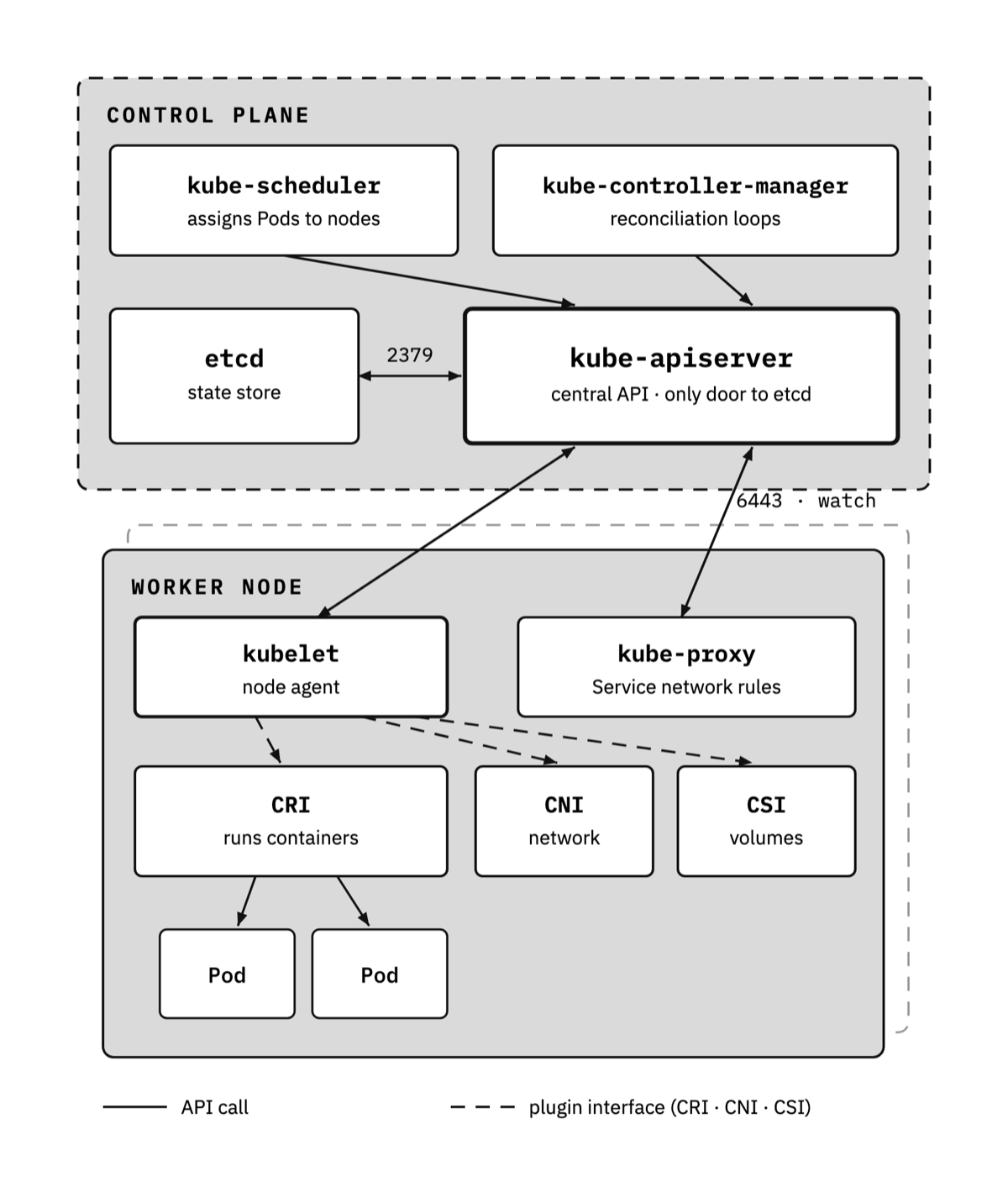
  • Diagram of a cluster’s architecture: on the left the control plane with kube-apiserver, etcd, kube-scheduler and kube-controller-manager; on the right the worker nodes with kubelet, kube-proxy and the container runtime. Every arrow from the nodes points at the kube-apiserver, and only the kube-apiserver talks to etcd.

    Fundamentals · diagram 1 of 6

    Cluster architecture

    Control plane and worker nodes: who talks to whom, and why the kube-apiserver is the only way in to etcd.

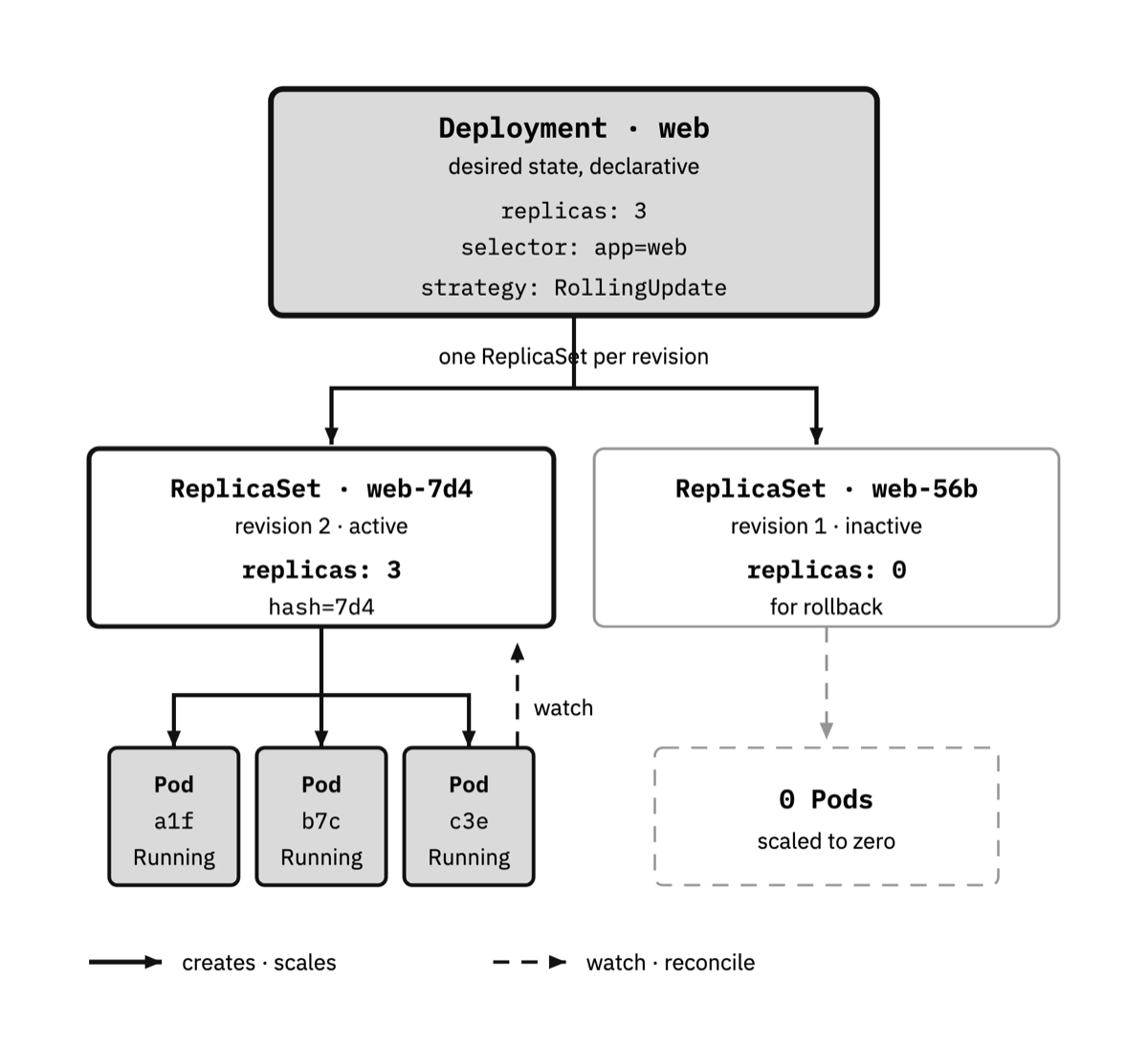
  • Hierarchical diagram: a Deployment at the top, below it two ReplicaSets (the old revision shrinking to zero and the new one growing) and, under each, its Pods. The arrows show the rolling update and the rollback to the previous revision.

    Workloads · diagram 2 of 6

    Deployments, rollout and rollback

    A Deployment manages one ReplicaSet per revision: that’s how it does rolling updates and rolls back with no downtime.

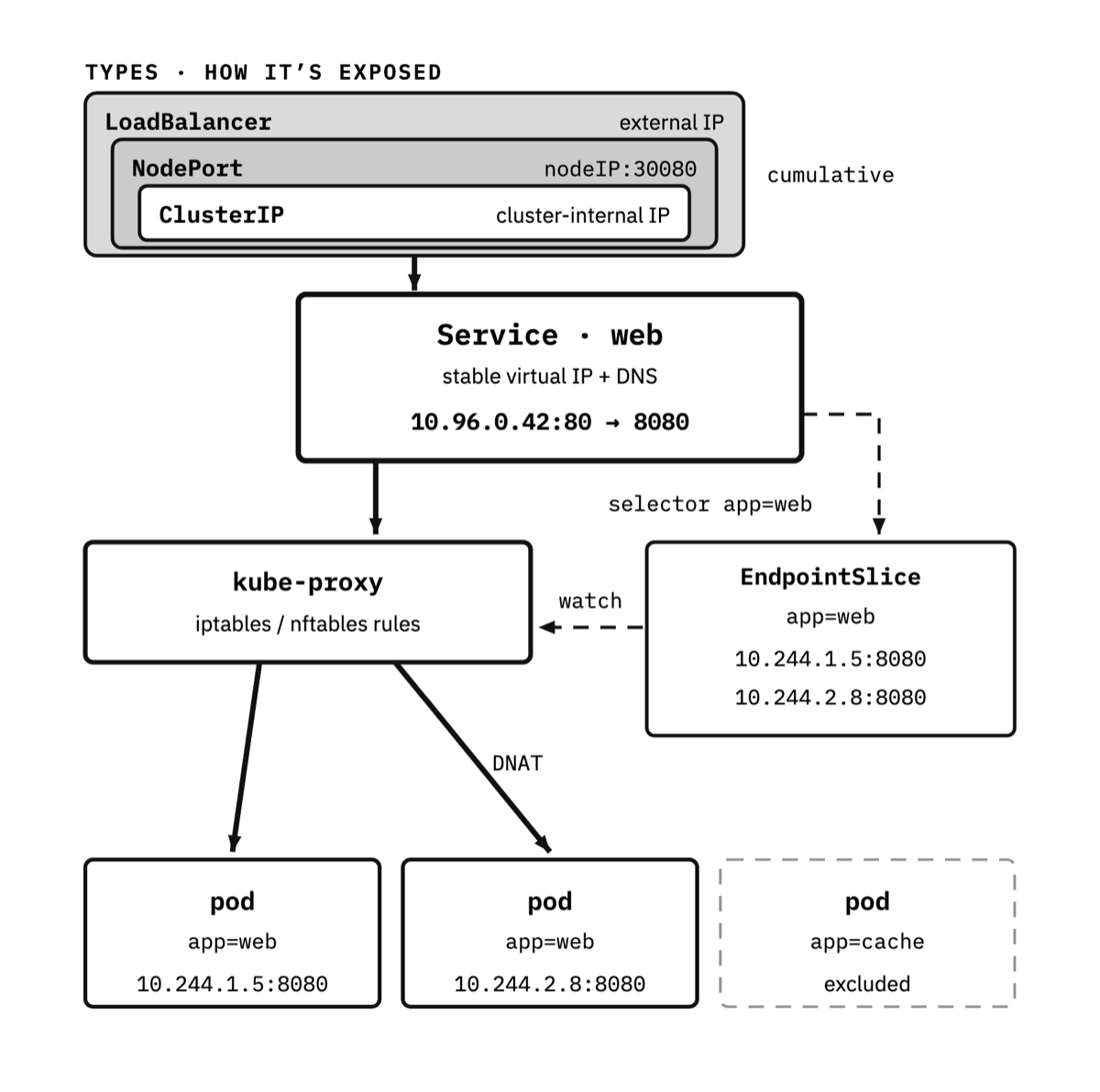
  • Comparative diagram of the Service types: ClusterIP, NodePort and LoadBalancer. It shows the path traffic takes from the outside to the Pods, through kube-proxy and the EndpointSlices that say which Pods are ready.

    Networking · diagram 3 of 6

    Services and routing

    ClusterIP, NodePort and LoadBalancer: how traffic reaches the Pods via kube-proxy and the EndpointSlices.

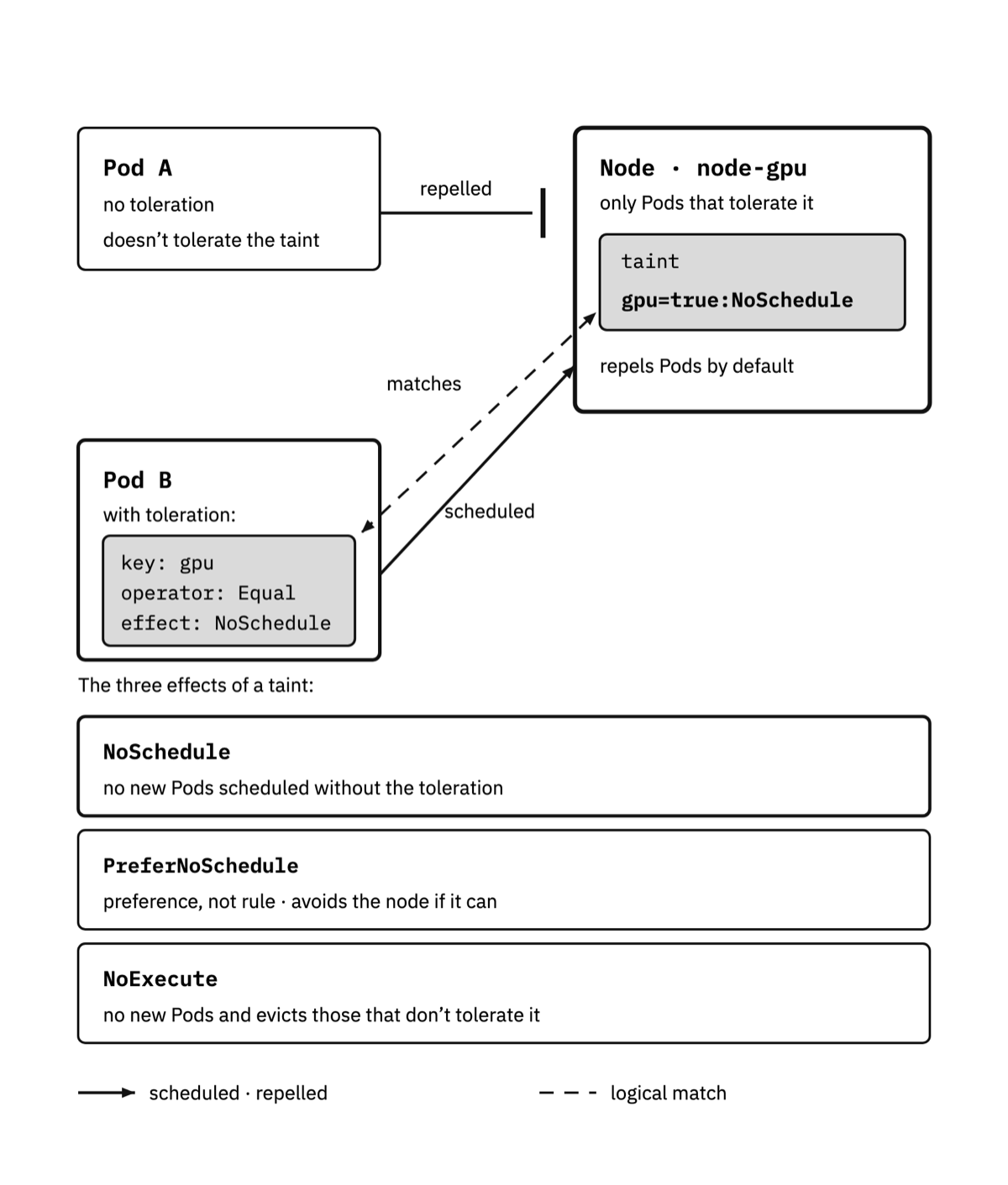
  • Diagram with several nodes marked with taints and Pods with and without tolerations. It shows the outcome of each combination depending on the taint’s effect: NoSchedule, PreferNoSchedule and NoExecute.

    Scheduling · diagram 4 of 6

    Taints and tolerations

    How to steer Pods toward—or away from—certain nodes, with the three possible effects of a taint.

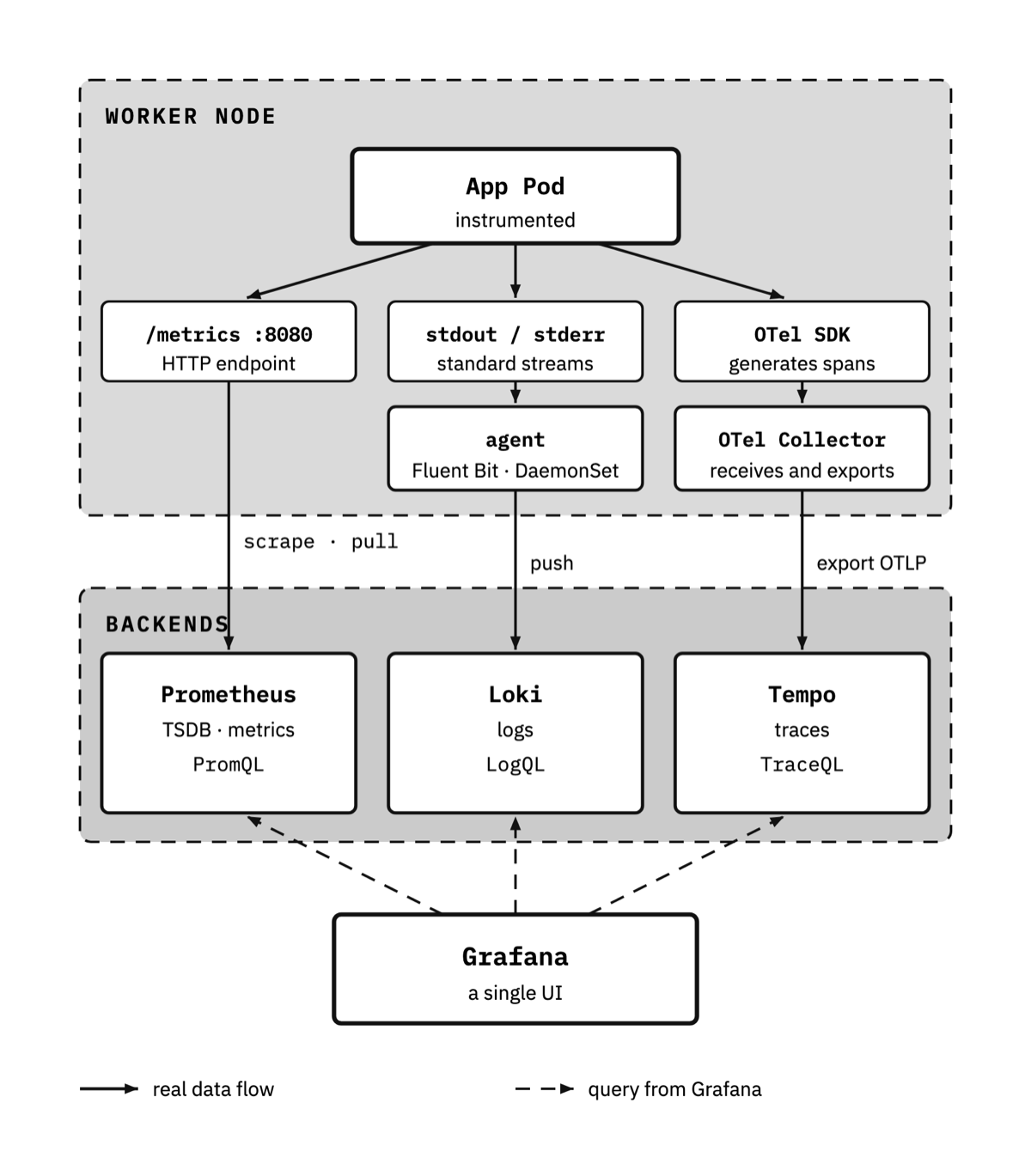
  • Diagram of the observability architecture: the Pods expose metrics that Prometheus collects in pull mode, the logs travel in push mode toward Loki, and the traces are grouped into spans. The three flows converge on Grafana as the visualization layer.

    Observability · diagram 5 of 6

    Metrics, logs and traces

    The three pillars are collected separately and converge on Grafana, with Prometheus, Loki and traces.

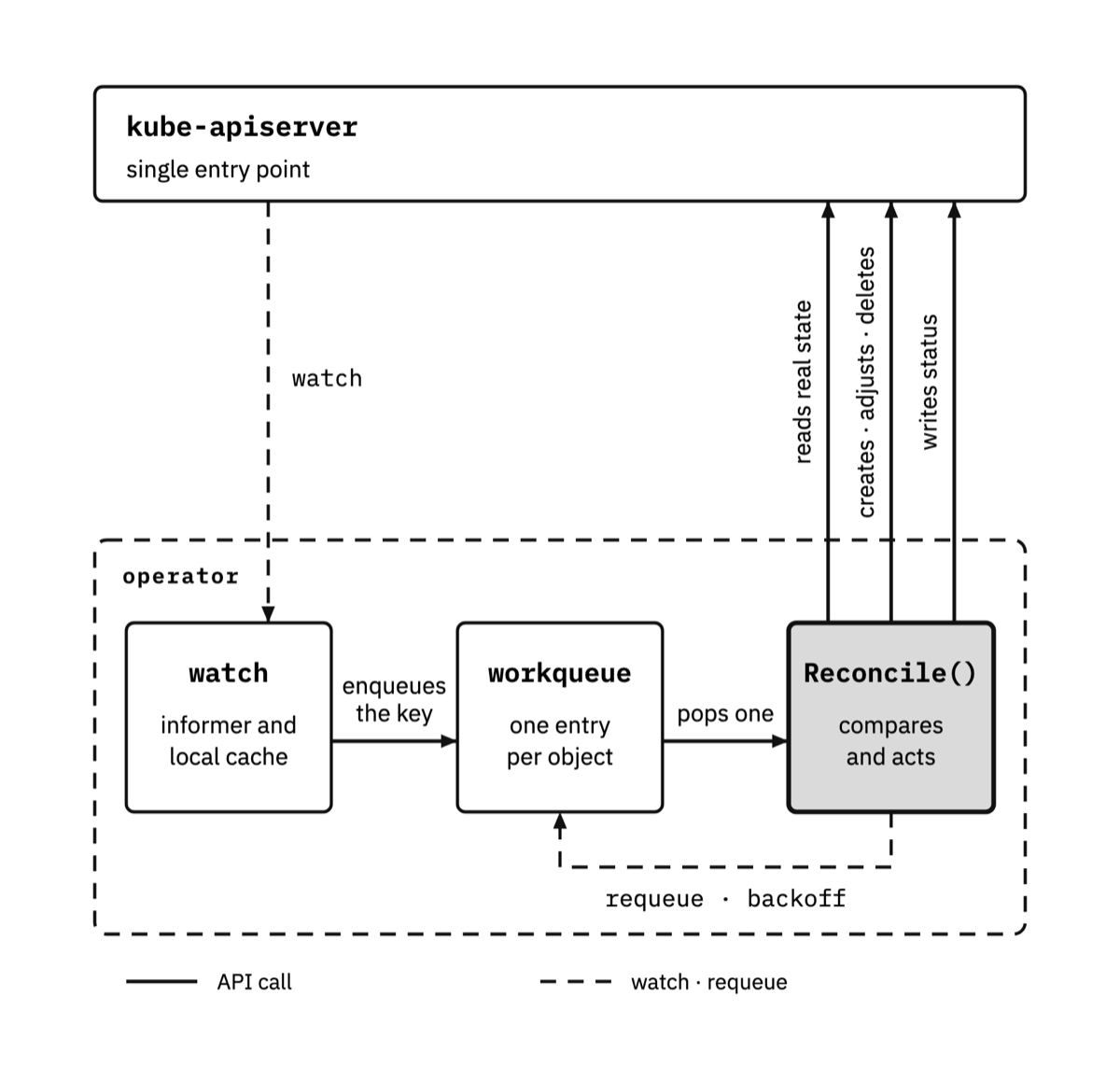
  • Diagram of an operator’s reconciliation loop: the watch signals a change in the resource, the operator reads the desired state and the current state again, acts to bring them closer and writes the result into the status. The notification and the state read are two separate arrows.

    Extensibility · diagram 6 of 6

    The reconciliation loop

    Why an operator doesn’t act on the notification but reads again: it doesn’t matter if two notifications arrive together or one gets lost.

1 / 6

How a page reads

239 questions, right under the YAML

Almost every technical book shows the manifest, explains three fields and moves on. The other nine just sit there. Here, under every manifest goes what you ask yourself when you read it for the first time, answered: not a quiz at the end of the chapter, but the answer right where the doubt shows up. Four pages of the Spanish printed edition, exactly as they come off the press.

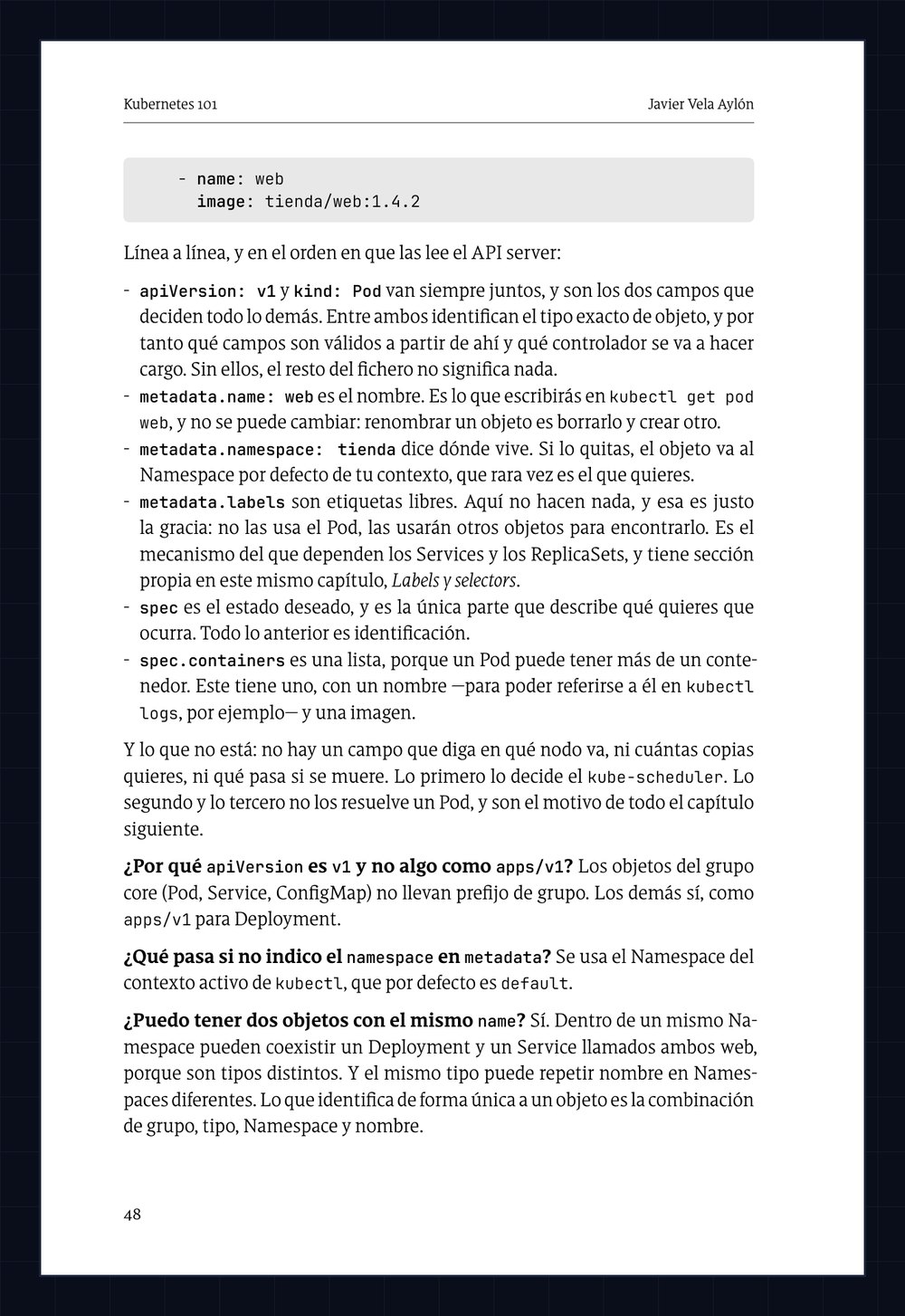
  • Page 48 of the Spanish printed edition. At the top, the end of the web Pod’s YAML manifest. In the middle, the field-by-field explanation: apiVersion, kind, metadata.name, metadata.namespace, metadata.labels, spec and spec.containers. At the bottom, three questions in bold with their answers: why apiVersion is v1 and not apps/v1, what happens if the namespace isn’t given, and whether two objects can have the same name.

    Chapter 4 · Kubernetes objects · page 48

    The first manifest, line by line

    Twelve lines of YAML explained field by field, and then three questions: why is apiVersion v1 and not something like apps/v1? · what happens if I don’t set the namespace? · can I have two objects with the same name?

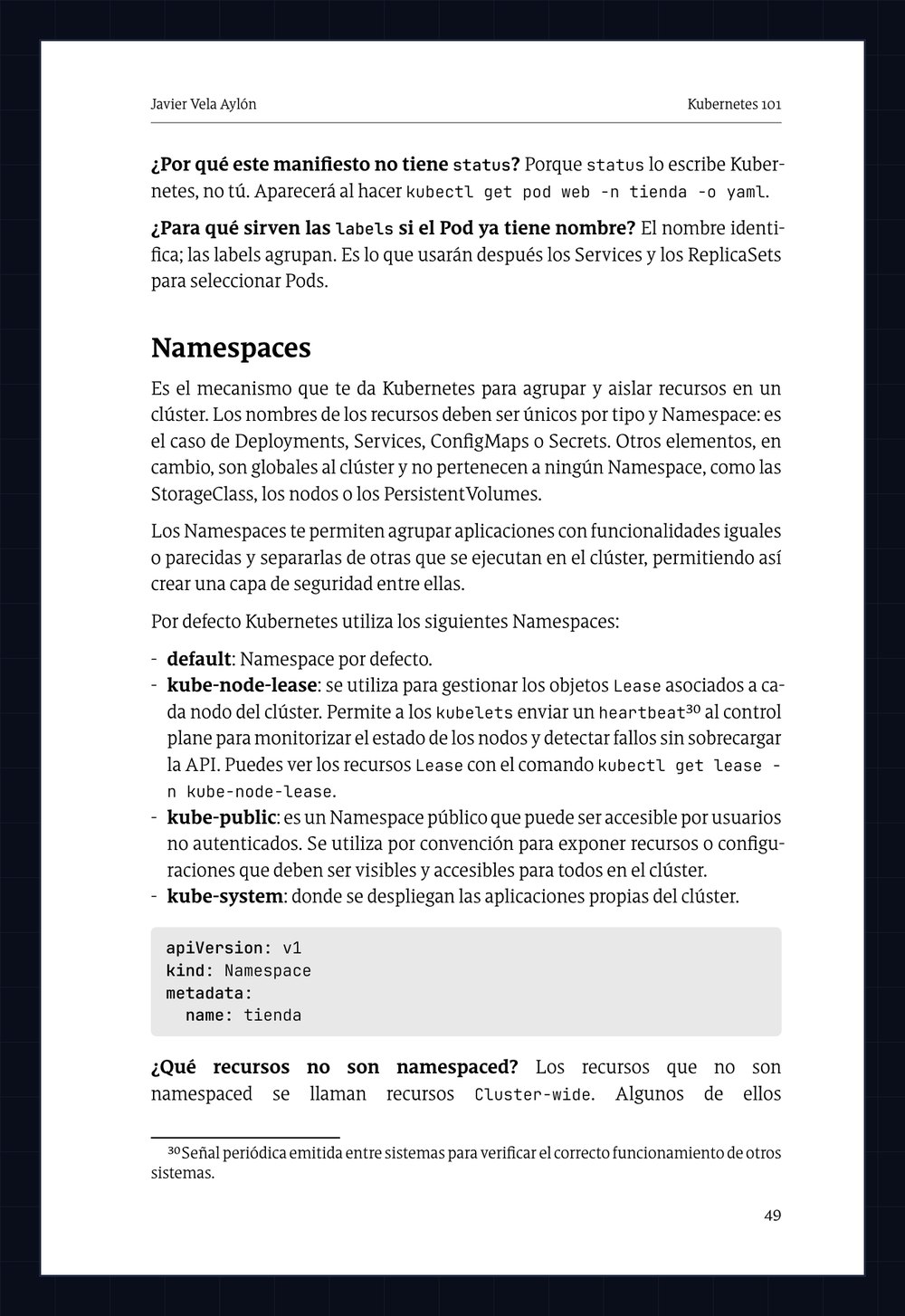
  • Page 49 of the Spanish printed edition. At the top, two questions with answers about the status and the labels. Then the Namespaces section, with the four Namespaces Kubernetes ships out of the box, the YAML manifest of the tienda Namespace, and the question of which resources aren’t namespaced.

    Chapter 4 · Kubernetes objects · page 49

    Namespaces, and what they don’t isolate

    The one most people get wrong is on this page: do Namespaces isolate network traffic? No. They separate names and permissions, not packets; to isolate traffic you need a NetworkPolicy, which arrives three chapters later.

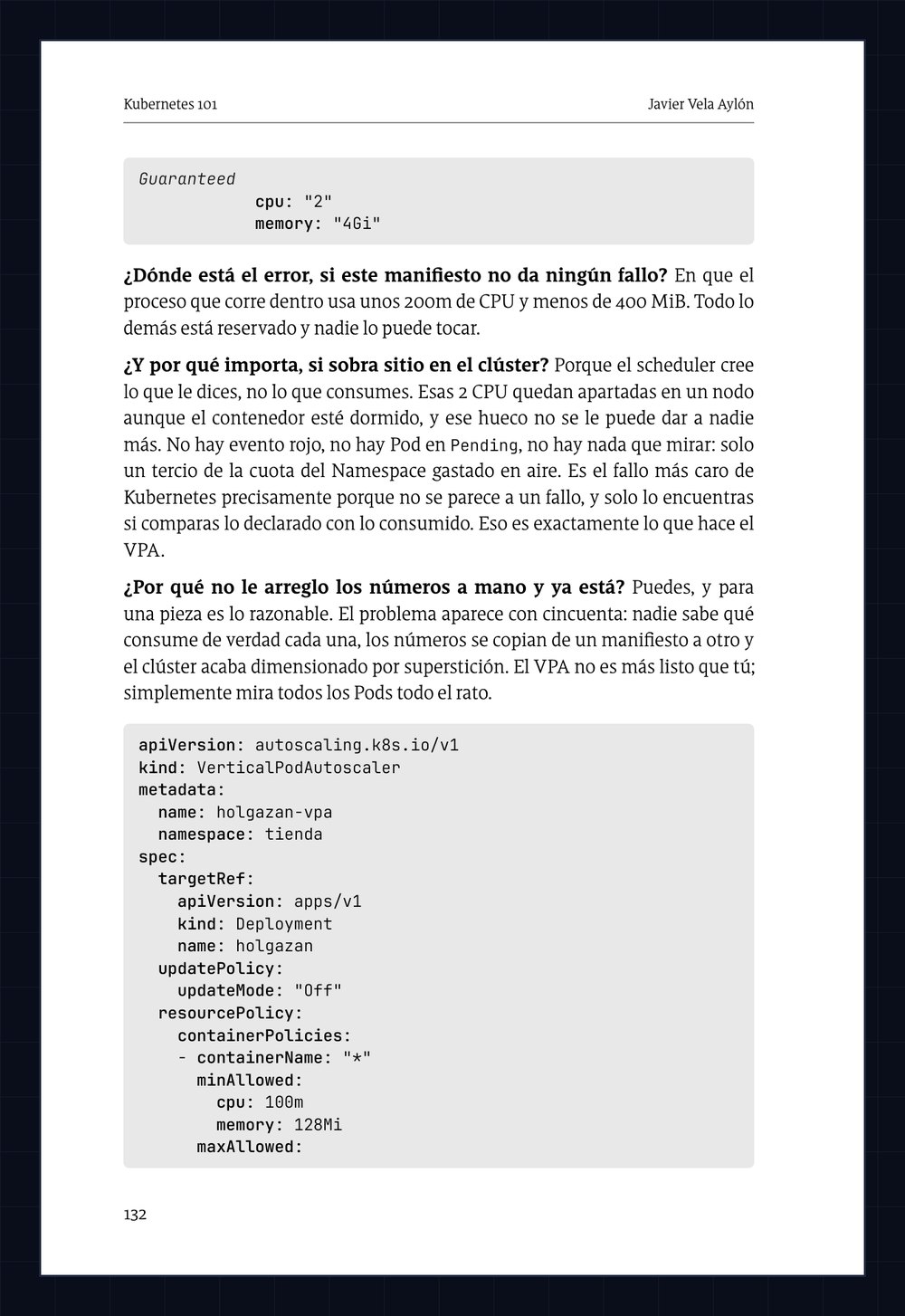
  • Page 132 of the Spanish printed edition. At the top, the end of a manifest that reserves 2 CPU and 4 GiB. Then three questions with answers about where the error is if the manifest raises no error, why it matters if there’s room to spare in the cluster, and why not fix the numbers by hand. At the bottom, the YAML manifest of the VerticalPodAutoscaler for the holgazan Deployment.

    Chapter 6 · Scaling · page 132

    The manifest that raises no error

    It asks for 2 CPU and 4 GiB, and uses a tenth of that. No red event, no Pod stuck in Pending: just a third of the Namespace’s quota spent on thin air. It’s the most expensive failure in Kubernetes precisely because it doesn’t look like one.

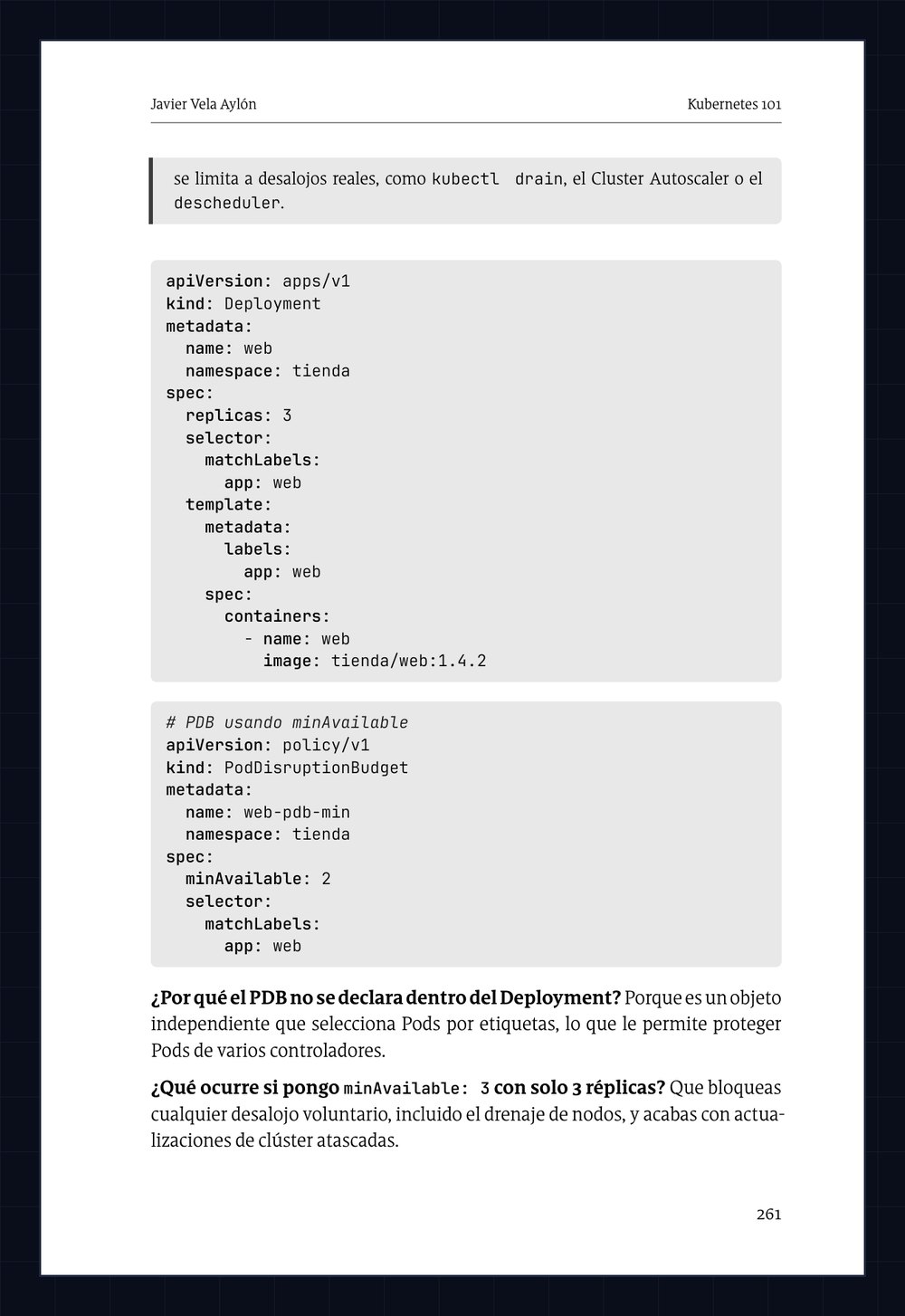
  • Page 261 of the Spanish printed edition. YAML manifest of a PodDisruptionBudget for the web Deployment, followed by two questions with answers: why the PDB isn’t declared inside the Deployment, and what happens if minAvailable is set equal to the number of replicas.

    Chapter 12 · Scheduling · page 261

    The protection that blocks maintenance

    What happens if I set minAvailable: 3 with only 3 replicas? You block every voluntary eviction, node draining included, and end up with stuck cluster upgrades.

1 / 4

The Workloads chapter has 45 questions and the Security chapter 42. All 239 are spread across the fifteen chapters, always right next to the manifest that prompts them.

The hands-on part

How the labs work

  1. Step 1

    Read the chapter

    The concept explained with its diagram and its examples, taking nothing for granted.

  2. Step 2

    Open the lab

    A real cluster in the browser, ready in seconds. Nothing to install on your machine.

  3. Step 3

    Fix the broken cluster

    You diagnose, you repair, and the lab verifies your solution. You learn by doing, not by memorizing.

A breather

What the cluster’s components have to say

No reviews here: these are signed by the Kubernetes components, which have been putting up with a lot for years. It’s a joke, but every complaint is true.

  • “I’ve been the only door to etcd for years and nobody understood me. After this book, even the new Pods know how to ask me for things by name.”
    kube-apiserver, keeper of the cluster
  • “I store everything, but explaining Raft consensus was impossible. The fundamentals chapter finally tells my story without losing a single record.”
    etcd, the cluster’s memory
  • “I used to place Pods blindly and got blamed for everything. Now readers understand my affinities, taints and tolerations… and even the challenge of turning me off.”
    kube-scheduler, the one who decides where you live
  • “I restart containers all night long and nobody ever thanks me. This book explains my probes so well that people treat me better now.”
    kubelet, the watchman on every node
  • “Translating Service names into IPs was my silent cross to bear. With the Networking chapter, they finally resolve my doubts before I resolve theirs.”
    CoreDNS, the cluster’s address book
1 / 5

Free, right now

Download the opening of the book

Subscribe to the blog and you get the opening of the book in full: “Before you start,” the Kubernetes architecture chapter and Appendix D: Inside the cluster.

Thirty-one pages and all eight diagrams, just as they appear in the book (for now, the pages of the Spanish edition; the English PDF will replace them). It isn’t a trimmed-down preview: it’s where you start reading it and where you finish understanding the engine room.

It’s the most honest way to find out whether the book is for you before paying anything.

If the form doesn’t load, subscribe at blog.javivela.dev.

Before you start

Frequently asked questions

No. The book starts with the fundamentals of containers and orchestration before touching Kubernetes, and takes nothing for granted.

Nothing. Every lab starts a real Kubernetes cluster in the browser; all you need is a connection and an iximiuz Labs account.

Yes. It’s also meant for people who use the technology every day and want to really understand what’s going on underneath, with the diagrams and the challenges as a safety net.

Both. The hands-on part is the same in either format, and it’s publicly accessible: you can open the hands-on guide without owning the book. Both the Kindle edition and the paperback are on Amazon.com and Amazon.co.uk; from anywhere else, order the paperback on Amazon.com with international shipping.

No. The hands-on part is public and free, and requires no additional purchase. It’s hosted on iximiuz Labs.

The 15 chapters and the 5 appendices, yes. There’s only one block that exists solely as a lab and has no chapter: the final challenge, and it’s marked as such in the syllabus. Extensibility does have a chapter, chapter 14: the book defines the CRD and explains what an operator does; the lab is where you write the whole thing, in Go.

The book is the 1.37 edition. Kubernetes publishes three versions a year, so no book will ever be on the latest one: that’s why it includes Appendix C, which records chapter by chapter the state of each feature and since which version it exists, so you can check at a glance whether what you’re reading still holds in your cluster. What 1.37 brings is summarized in what’s new in Kubernetes 1.37, and later corrections are published on the errata page.

About the author

Javier Vela Aylón

A .NET developer turned Senior Software & Platform Engineer, with over 20 years building and maintaining platforms. Certified in Azure and in the CNCF ecosystem, and a speaker at DotNetters.

I write about DevOps, Azure, AWS, CI/CD, Kubernetes, containers and architecture at blog.javivela.dev.

Code

Every manifest in the book, on GitHub

The repository gathers the YAML, the examples and the Go operator exactly as they appear in the chapters and in the labs. Clone it, break it, and send a pull request if you find something to improve.

Kubernetes 101

From a bare Pod to a system you understand

367 pages, 15 chapters, 5 appendices and 55 labs on a real cluster. Built on Kubernetes 1.37, the book’s reference version.